First run
The application opens on a welcome screen and is organised into workspaces along the top. You will spend almost all of your time in two of them.
- Create — the 3D scene, the timeline and the inspector. This is where a project is built.
- Convert — import and export, batch jobs and the whole tool suite. No scene, no timeline, just files in and files out.
- Play — a player for finished work, with the same rendering path the free player uses.
- DJ — two decks, crossfader, cue points and a setlist, with the whole scene still spatial rather than folded to stereo. Arrives in version 1.2.
- Perform — a live deck for a single piece: trigger sections by hand, drive objects from a controller, react to what the room is doing. Arrives in version 1.2.
DJ and Perform are described here because the format already carries what they need — the trigger system, the pattern engine and per-object streaming are all in 1.0. What is missing is the surface, not the substance.
Before you start a project, open the profile window and set the world. Everything about distance, Doppler and reverb depends on it, and it is far easier to set once at the beginning than to change halfway through.
Objects
An object is one sound with a position. Not a channel, not a bus — a source that exists somewhere in a room and can move.
Each object carries its own audio, its own position over time, its own gain, and optionally a set of rules about how it reacts. That bundle travels together through the whole chain: it is still a bundle in the delivered file, and still a bundle when a player opens it. Nothing is folded down until the last possible moment, on the listener's device.
How many you can have at once depends on your licence — 192 on Studio, 512 on Pro, 1024 on Enterprise. Playback is never capped, on any tier.
Focus and anchors
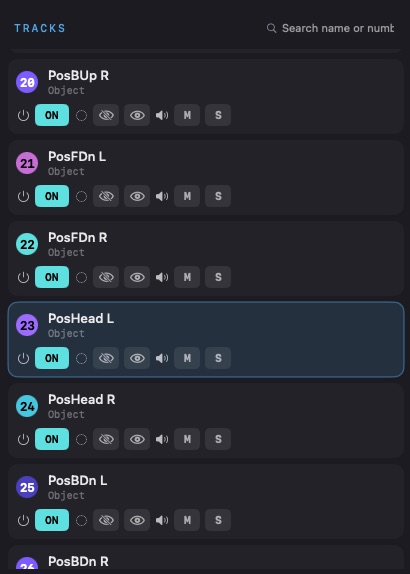
Focus decides how sharply an object is drawn. A wide focus spreads it across neighbouring speakers and fills the room; a narrow one pins it to a point. It is set per object and as a default for the whole package, and the number means the same thing in the monitor, in the export and in a player on someone else's device.
An anchor binds an object to one particular speaker while leaving its position alone — useful when a source has to come out of a specific box regardless of geometry. If the file lands on a rig that has no such speaker, the object quietly falls back to free panning. An anchored mix still opens everywhere.
The track sheet
Every track in one table: name, on, mute and solo, volume, ball, XYZ, where its motion comes from, which pattern or path, stereo spread, focus, and which speaker it is assigned to. Sort it, search it, filter by ball or by audio.
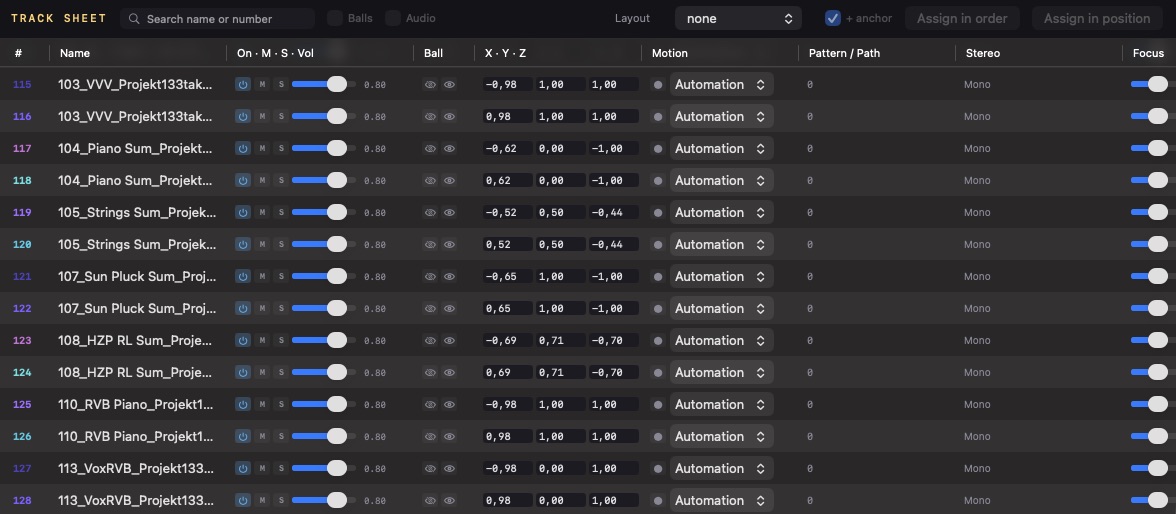
Two ways to assign a whole layout at once. In order maps tracks to channels by their sequence — the fastest route when a multichannel file arrives in a known order. In position places each track at the real coordinates of the speaker it belongs to, which is what you want when the rig is unusual.
Beds
Not everything wants to be an object. Room tone, a reverb return, a stereo pad — these belong in a bed, which is a fixed channel layout that plays to the speakers directly. A project can mix beds and objects freely, and both survive an ADM export.
The world
A world is a room described in real metres, either as a sphere with a radius or a box with width, depth and height, plus a listener position inside it.
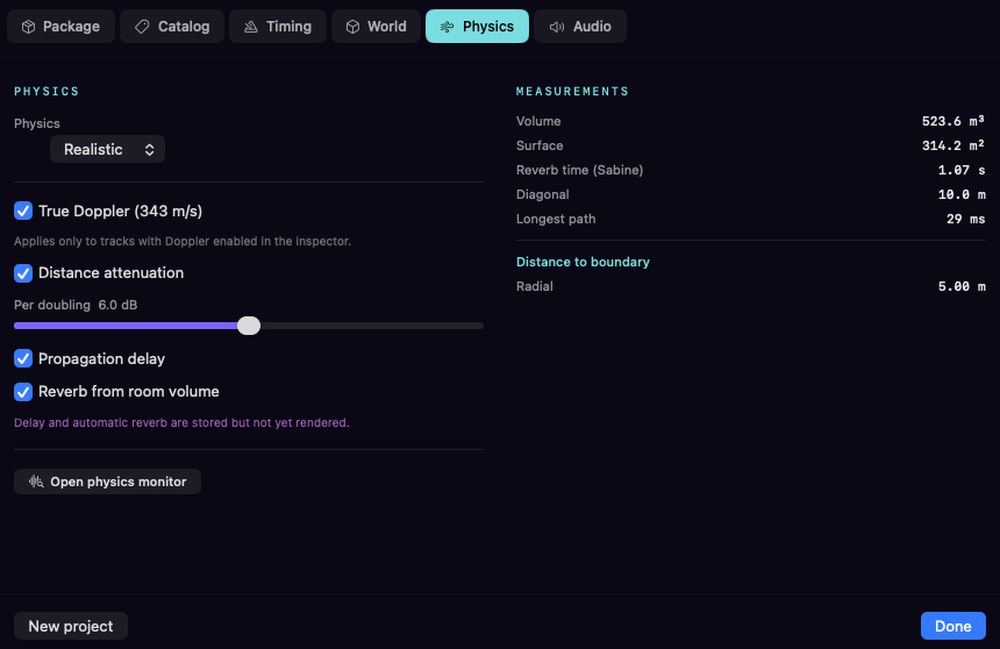
The world is what makes physics possible. With one defined, true Doppler at 343 m/s and distance attenuation follow as consequences rather than effects you dial in. Without a world, neither runs — and that is deliberate. A music project should never suddenly acquire Doppler because somebody moved an object quickly.
Two further consequences, propagation delay and reverb derived from the room volume, are calculated and written into the file but not yet rendered in Studio. The application says so on the panel rather than leaving you to work it out. They are part of the scene a player receives; what is missing is the monitoring path, and that is honest work still to do.
What the numbers mean
- Reverb time (Sabine) — what a room of that volume and surface would do acoustically. It tells you whether the space you invented is a studio or a cathedral before you put a single sound in it
- Longest path — how many milliseconds sound needs to cross the room diagonally. Above roughly 30 ms you are in echo territory, which matters for how a scene reads
- Distance to boundary — how far the listener sits from the wall, which is what distance attenuation is measured against
Physics can be bypassed globally for A/B listening. That switch is a monitoring state and is never written into a file.
Motion
There are three ways to move an object, and they can be combined.
- Keyframes — you place positions on the timeline and the object interpolates between them. Use this where the movement has to be exact, or has to hit a picture cue.
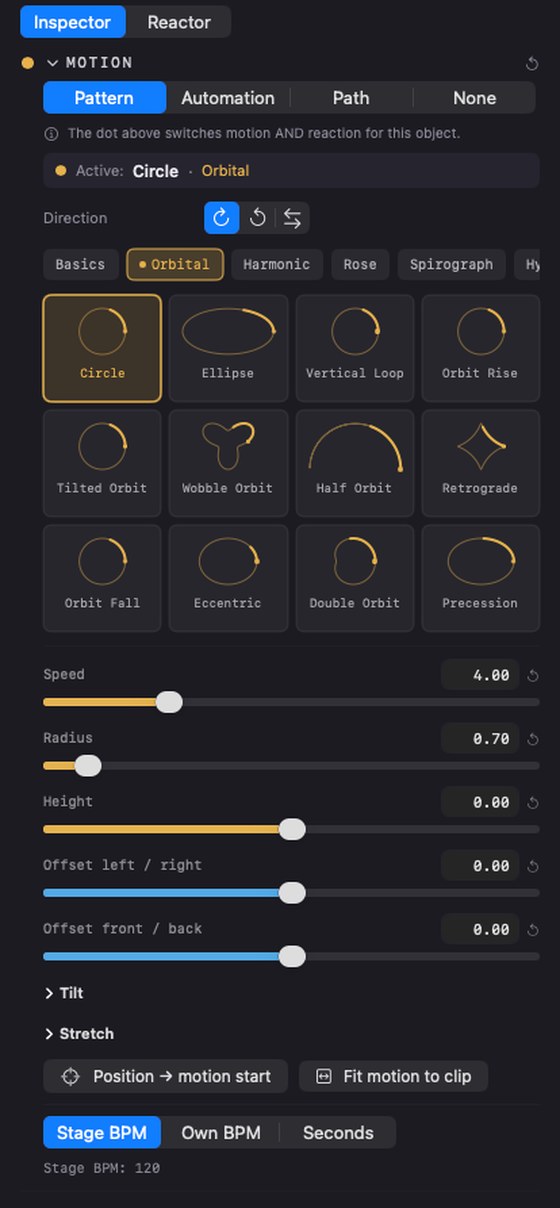
- Patterns — 156 built-in trajectories in 13 groups: orbits, spirals, pendulums, hypocycloids, flocking, and physics and chaos attractors that keep evolving instead of repeating. A pattern is a behaviour, not a recording, so it is still running when the listener presses play.
- Free paths — you draw a path in space, set the timing per segment, and choose how corners behave. Between a keyframe and a pattern in both effort and control.
Shaping a pattern
Every pattern can be tilted and stretched on all three axes, which is what turns 156 trajectories into something closer to an infinite set. Tempo comes either from the project, from the object's own BPM, or from a plain number of seconds per cycle. Direction can be forwards, backwards, or bouncing between the two.
Gates
Each object has its own motion gate — a dot in the inspector — and there is a global runner that gates all of them at once. An object only moves when both are open. This is how you audition one moving object against a still scene.
Triggers
A trigger is a rule that resolves during playback, on the listener's device. This is the part no other streamable format offers, and it is what the format exists for.
Triggers are grouped into four namespaces:
- sensor. — head and device motion, touch, shake
- bio. — heart rate, breath
- env. — ambient noise, light, time of day
- session. — elapsed time, loop count, playback state
A trigger fires a sequence: a series of steps that move an object, change its gain, start or stop a pattern, or wait. Sequences run to completion and clean up after themselves, so a scene always returns to a known state.
Two kinds of trigger behave differently and it is worth knowing which is which. An impulse has no duration — a tap, a shake — and always runs its sequence to the end. A value is a continuous level — a heart rate, a noise floor — and you choose what happens when it stops: hold the value, snap back, or glide.
You can fire triggers by hand from the react pad while the transport runs, which is the only sane way to build a reactive scene.
Getting audio in
- Audio files — drag WAV, AIFF, M4A or AAC onto the scene. Each file becomes one object.
- Stems — a folder is analysed by filename and by signal, and you review the guesses before anything is committed. Nothing is placed behind your back.
- ADM-BWF — objects arrive as objects, with their movement intact. Round-trips losslessly.
- IAMF — including material shipped under the Eclipsa name.
- Multichannel and Ambisonics — split into discrete objects on the way in.
- Microphone arrays — a folder from a spherical microphone becomes objects pointing where the capsules point. Seven arrays are built in and you can describe your own.
- Stereo — through Lift.
Microphone arrays
A spherical array hands you a folder of numbered files and no indication of which way anything pointed. Two things go wrong there, and both are silent.
Sorting. Nineteen files sort lexically as 1, 10, 11, …, 19, 2, 3 — so capsule two ends up at position eleven. The scene looks plausible and is wrong. Files are read numerically here, always.
Dead channels. A loose cable produces a file, just a silent one. Every channel is measured before import and marked live, quiet, dead or clipped, and you can solo any capsule while looking at where it points.
Seven arrays are built in. For anything else, describe the capsule directions once and save it — a new microphone is a new file, not a new version of the application. If nobody documented the geometry, directions are spread evenly over a sphere by the golden angle and labelled as an estimate, because a guess presented as a fact is worse than a guess.
Recording works from inside the application too: pick the interface and a folder, and every capsule lands as its own numbered file, ready to import.
Lift
Lift separates an existing stereo master into stems on your own machine — nothing is uploaded — and then distributes them into the room. Thirteen genre presets give you a starting distribution rather than a blank scene, and the distribution editor lets you adjust fan, scale and zone mapping and save your own.
It is not an upmixer. What comes out are real objects you can then move, trigger and export like any other.
Monitoring
You do not need a certified room. Binaural over headphones is enough to author, and any rig geometry works for checking.
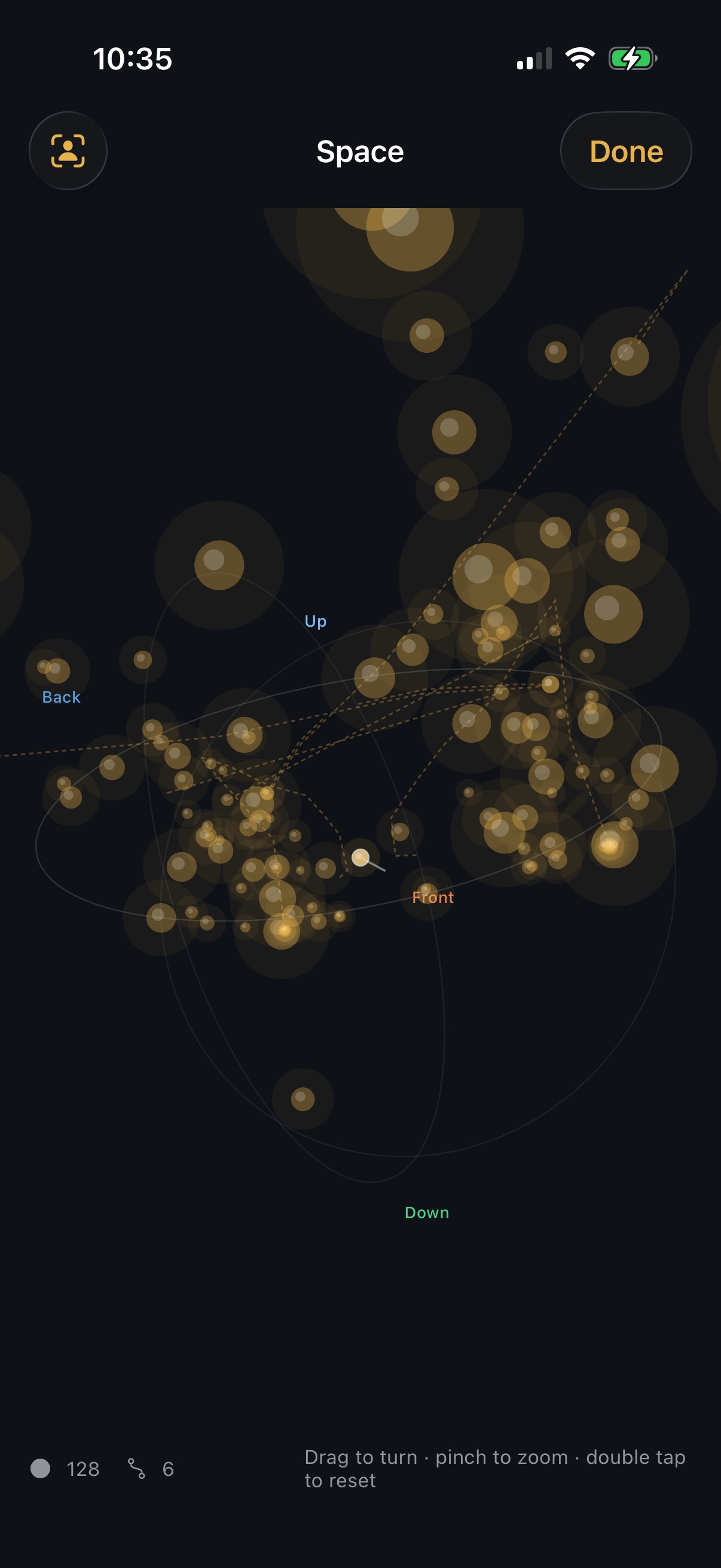
- Space Monitor — a separate window showing the rig, the listener and every object moving in real time. The ear follows the camera, so moving the view moves the listening point, exactly as it does in the mobile player
- Energy heatmap — where the energy actually sits, in four readings: real-time or accumulated, as separate circles or as one interpolated field
- Loudness — integrated LUFS, peak and true peak across five different folds at once, measured to BS.1770-4
- Downmix check — what your scene sounds like when it is folded, before a platform folds it for you
- QC suite — true peak, null test, codec simulation, club and mono compatibility
The loudness reference is the stereo fold, not the binaural one. Binaural measures several decibels lower because folding many delayed copies of the same signal comb-filters it — using that number for normalisation would push everything far too loud.
Delivering
One project, several correct masters. What you export depends on who is asking.
| Target | What it is for |
|---|---|
| ADM-BWF | The master format distributors accept for immersive delivery |
| IAMF | The streaming route, including the Eclipsa-branded platforms |
| SMXD | The saimox delivery — streamable, reactive, per-object |
| Downfolds | Fixed speaker renders from 1.0 mono to 9.1.6 |
| Binaural | A two-channel fold for headphones |
| IAB, NHK 22.2, Auro-3D | Cinema, broadcast and the Auro layouts, on Enterprise |
Loudness targets are applied per platform on export, so the same project produces a correct master for each destination without remixing. There is no watermark and no per-release charge on any tier.
SMX and SMXD
Two files, one format family, different jobs.
- SMX — the working master. Uncompressed audio, every editable structure, references to material on your disk. This is what you keep and what you archive.
- SMXD — the delivery. Audio encoded to Opus or PCM, split into independently addressable blobs, everything baked that needs baking. This is what you send, host and stream.
Both open by double-click from the Finder, and a player reads the cover, the catalogue information and the energy envelope straight out of the file before decoding a single sample. Both are plain ZIP containers with a manifest, a spatial description and audio. Nothing about reading them is secret and nothing about writing them costs a fee — see Formats for how they compare to ADM and IAMF.
The players
Three players, one rendering core. The split that makes that possible is worth understanding, because it explains why a piece sounds the same everywhere.
The core parses and computes. The platform decodes and renders. libsaimox — the shared library described below — reads the container, reads the scene, and works out where every object is at every tick. What crosses the boundary is one flat array per frame — five values per object: x, y, z, gain, active. Decoding the audio and putting it into your ears is done by whatever the platform does best: AVAudioEngine on Apple, Web Audio and WebCodecs in the browser, Oboe on Android.
That is why the conformance fingerprint means something. The maths lives in one place, so two devices reporting the same number are not similar — they are identical.
saimox Player for iOS
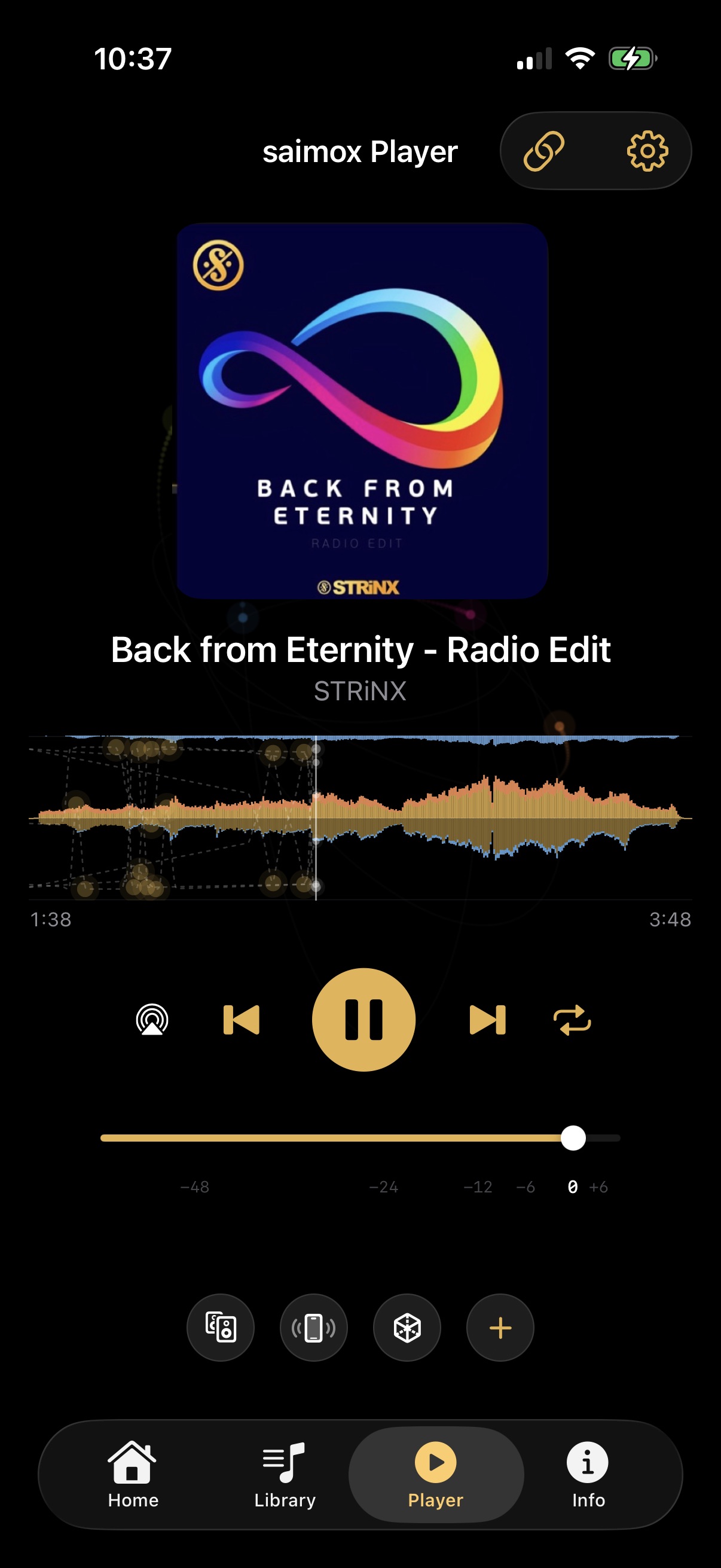
Free on the App Store, for iPhone, iPad and Apple silicon Macs. Five tabs: library, player, space, info and settings.
- Library — files you added and pieces you downloaded, plus playlists. Add by tapping a file in Files, by AirDrop, by sharing from another app, or from the folder icon
- Player — transport, a volume fader on a real decibel scale from −60 to +6 dB, and the output picker for AirPlay or a cable
- Space — the room from outside or from the listening position, in portrait or fullscreen landscape
- Info — cover, title, credits, album, genre and year, all read out of the package itself
- Settings — appearance, language, loudness target, ball appearance, storage
Head tracking
With headphones that have motion sensors — AirPods Pro, AirPods Max and similar — the sound stage stays where it is while you turn your head. Three things have to be true: the headphones must have the sensors, tracking must be on in the player, and iOS must have granted motion access. If you refused that question once, iOS never asks again; it goes back on under Privacy & Security, Motion & Fitness.
Over AirPlay it is switched off deliberately. With a second or two of buffering the room would turn visibly later than your head, which is worse than no tracking at all.
The motion data never leaves the device. It is used in the moment and kept nowhere.
The ear follows the camera
In the space view you can orbit the room from outside or sit inside it. A coupling button ties the listening position to the view, so turning the camera turns your head in the scene. It is the same gesture as the one in Studio's Space Monitor, deliberately — learn it once.
Second screen
Plug in a cable or pick a TV in AirPlay and the external display fills with the view you chose in settings — the room, the energy curve, the artwork or the numbers — while the phone stays playable. There is no switch to find.
The sound is independent of the picture. With a USB-C hub you can send the room to a projector over HDMI and the audio to a PA over the headphone jack, and drive the whole thing from the phone. Pick the output with the AirPlay button, because iOS will otherwise decide for you.
Projectors and televisions add thirty to a hundred and fifty milliseconds of their own delay, so the balls arrive slightly after the sound. A cable beats AirPlay and a projector in game mode beats one in cinema mode. We do not correct it by delaying the audio, because that would be the wrong trade.
Streaming
A piece opened from an address does not download in full before it starts. The player keeps a rolling buffer of raw slices — roughly a minute ahead — and decodes as it goes. That survives a train tunnel; an eight-second decoded buffer did not.
Loudness
Set a target in settings and every piece is brought to it, measured to BS.1770-4. Quiet pieces are raised only as far as their peak allows, so nothing is squashed by a limiter, and a piece already close to full scale stays below the target. That is correct behaviour, not a fault.
Folding many objects to two ears without attenuation clips reliably, so the player reduces by a fixed amount that depends on how many there are — the same amount Studio uses, so a piece sounds the same in both. The fader goes to +6 dB if you want it back.
The web player
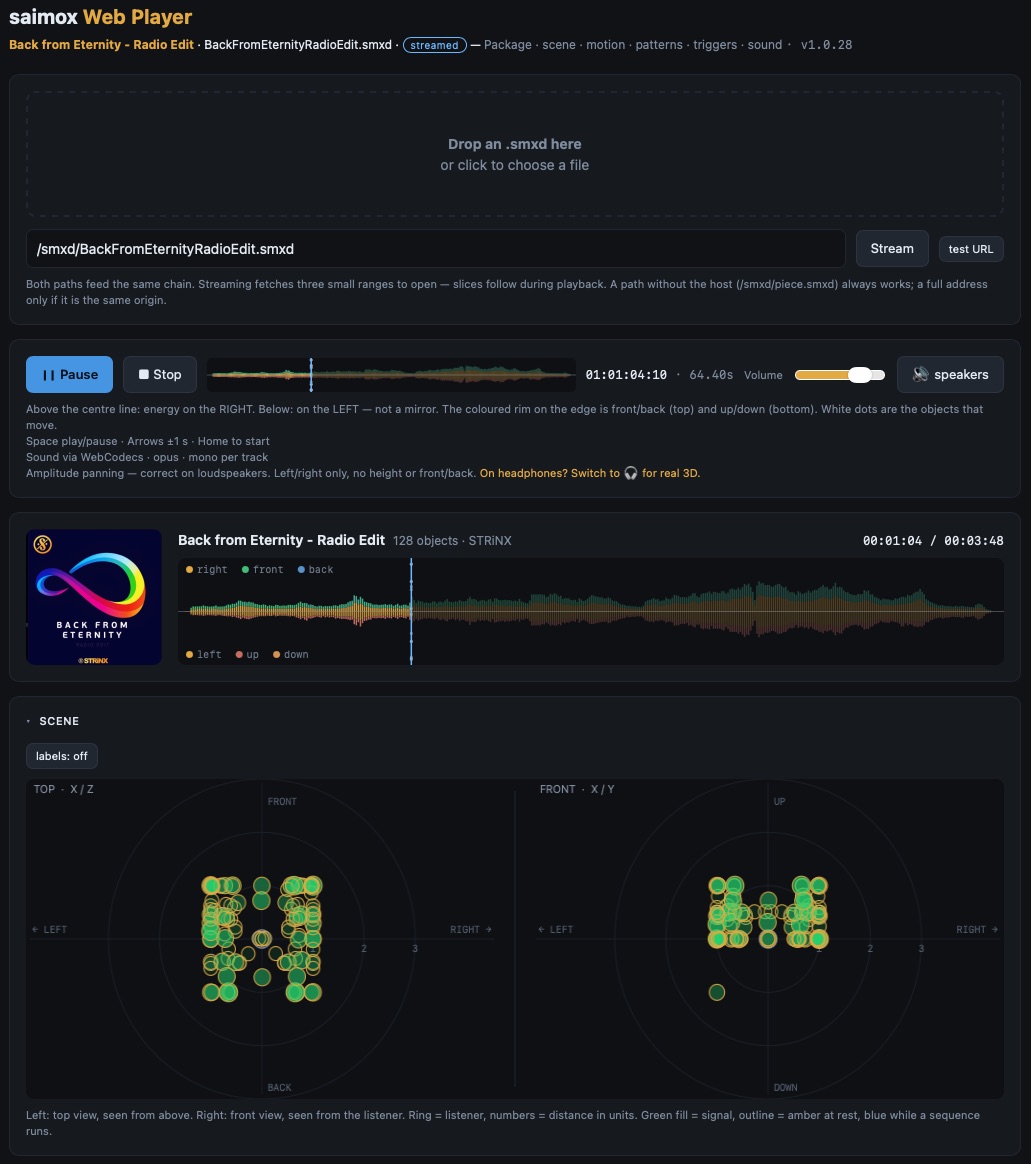
Online now. No installation, no account, nothing to sign up for — a link opens a piece in three dimensions in any current browser. Five pieces are playing on this site →
It runs the same libsaimox, compiled to WebAssembly. The division of labour is the same as everywhere else: WASM parses the container and computes the motion, JavaScript fetches the bytes, decodes Opus through WebCodecs and renders the audio through Web Audio.
- Two ways in — drag a file onto the page, or open an address. Everything after loading is identical; only the byte source differs
- Opening a stream costs three small requests — the end of the archive, its directory, then thirty bytes per entry. The scene is on screen before a single byte of audio has been fetched
- Triggers become real controls — a sensor.shake in the file appears as a button, a sensor.tilt.left as a slider. Press it and the object visibly moves
- Keyboard — space plays and pauses, arrows step a second, Home returns to the start
- Embeddable — drop it into your own page and it carries the piece with it
Nothing about your listening is reported anywhere. The render happens in your browser.
Android
Next in line, running the same core with the same conformance fingerprint — so a piece behaves exactly as it does on iOS. It adds the one thing iOS will not allow: keeping your library on a memory card or an external drive.
What every player shares
- Free, uncapped, no account — a piece with a thousand objects plays on a licence that costs nothing
- Rendered locally — the player gets the piece and a description of the speakers actually present, and renders for that room
- Cover, information and envelope come out of the package before any audio is decoded
- Colour is never the only signal — a marker changes its text as well as its colour, because roughly one man in twelve would otherwise miss it
- SMXD is the delivery format — Studio opens the .smx master too, players open .smxd
libsaimox — the shared core
One library, written in Rust, that every player runs. It is the reason a piece behaves the same on an iPhone, in a browser and inside Studio, and it is free for anyone to build on.
What it does, and what it deliberately does not
The library parses and computes. It reads the container, reads the scene, resolves patterns, triggers and physics, and works out where every object sits at every tick. What it hands back per frame is a flat array — five values per object: x, y, z, gain, active.
It does not decode audio and does not touch your speakers. That is left to whatever the platform already does well: AVAudioEngine on Apple, Web Audio and WebCodecs in the browser, Oboe on Android, Core Audio inside Studio. A library that tried to own the audio path would be worse at it than the platform, and far harder to port.
It also never touches the network or a filesystem. Every entry point takes bytes and returns values — the host decides where those bytes came from, which is why the same library serves a local file and a streamed one without knowing the difference.
The conformance fingerprint
Every build reports a short identifier derived from the movement formulas themselves — the pattern maths, the phase origin, how tempo resolves, the order transforms are applied in, how clips are windowed.
Two builds reporting the same fingerprint compute the same positions. Not close, not within a tolerance — the same. When the maths changes, the number changes, and every player that reports the old one is visibly out of date rather than quietly different.
If you write your own player, this is how you check it against ours: one call, one comparison.
Where it runs
- Apple — a static library with a C header, used by both Studio and the iOS player
- Browser — the same code compiled to WebAssembly, a couple of hundred kilobytes
- Android — cross-compiled for ARM, with libopus linked in
- Anywhere else — Linux, Windows, embedded. A C ABI and no exotic dependencies, so if there is a C compiler there is a path
Building on it
You do not need permission and there is no fee from us. Writing your own player, putting one in a device, or writing saimox files from your own software is explicitly allowed — for a million units as much as for one.
Keyboard
Every function is reachable without the mouse. Arrow keys navigate, Enter triggers, Delete removes, Shift and Command extend a selection, and the transport has its own shortcuts. This was designed in from the start rather than retrofitted, because a tool you have to point at is a tool that slows you down after the first week.
Esc cancels. Every import, export and batch job stops cleanly when you press it, without leaving half-written files behind. The complete shortcut list is in the application under Help.